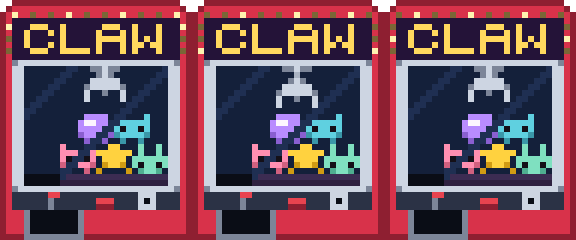

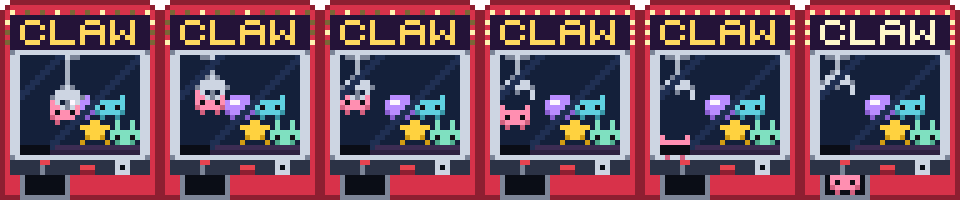
A whole arcade cabinet as one sprite: bulb crown, lit CLAW marquee, glass window with a plush pile behind it, joystick and coin slot, prize door at the bottom. No creature, no metric, no metaphor — just a machine that is quietly lying to you.
Three loops:
- attract — nobody playing. The claw hangs parked on its cable, bobs a pixel, and the crown bulbs chase in threes.
- grab — the joke. The carriage tracks right, the claw drops, closes on the gold star, lifts it clear of the pile, drifts back toward the chute — and then the prongs splay open, well short of anywhere useful. The star falls home. The cycle loops seamlessly because the last frame lands it one pixel above its own slot in the pile.
- jackpot — the rare one, and deliberately drawn as an event rather than a state: the bear rides all the way to the chute, drops, sinks out of the playfield, and turns up behind the prize door while every bulb on the cabinet goes full bright at once and the marquee letters wash out.
The only difference between the two outcomes is which frame the prongs open on, which is roughly how the real machines work.
Reuse
export/claw-sheet.png— 576×40 strip, eighteen 32×40 frames in sheet order:attract-0..2,grab-0..8,jackpot-0..5.claw-{attract,grab,jackpot}-*.png— the individual frames.claw@6x.png— prescaled 6× hero shot for docs/previews.
Render at integer scales with nearest-neighbor filtering or the edges smear.
attract plays at 2.5 fps, grab at 5 fps, jackpot at 4 fps (ANIMATIONS
in the module carries all three). jackpot and grab are one-shots by
intent — the demo plays either once and falls back to attract.
Source
No .aseprite — the canonical source is source/claw-machine.mjs: a
framework-free ES module holding the pixel grids as character maps (one char
per pixel, palette at the top). Edit a grid and regenerate everything with:
node source/render.mjs(needs site/node_modules installed — the script resolves Playwright from
there.) That one command rewrites export/, media/, thumb.png, and
the demo’s bundled copy of the module, so nothing drifts.
How the frames are built
One static 32×40 CABINET grid carries everything that never moves — crown,
marquee panel with the CLAW letterforms baked in as Y cells, window frame,
glass, playfield floor with the chute mouth cut out of it, control panel,
prize door. Every moving part is procedural and painted over it in a fixed
order, so a frame declaration is a short list of positions rather than a
second copy of the artwork:
- chassis from the grid (
Ycells swap to a brighter colour when a frame setsbright), - the
PILE— five plushes from four 6×5 shape maps, recoloured per entry — minus any index the frame lists inhide, - a plush in flight (
falling), then the one in the claw (carry), both before the claw so the prongs read as being in front, - cable, carriage and the 7×5 claw in its
openorshutpose, - the chute mouth repainted black, which is what makes
jackpot-4read as the bear being swallowed rather than sitting on the floor, - two diagonal streaks of glass over the whole window,
- the bulb chase, and
- the prize behind the door, clipped to the opening.
Steps 5 and 6 are the two that sell it. Without the chute repaint the drop looks like a plush parked on a hole; without the sheen the window doesn’t read as glass and the pile looks like it’s sitting on the front of the cabinet.
Gotchas
validateGrids()throws on ragged rows, missing shapes or colours, and — the one that actually caught bugs — a claw position that would put the prongs or the cable outside the window. Call it after editing, or just runrender.mjs, which calls it first.demo/claw-machine.jsis generated. Editsource/claw-machine.mjsand re-render.- Plush colours are named (
PLUSH_COLORS), not hex, because the same teddy shape is used twice in the pile at different colours and once again for the prize behind the door. - The demo draws the sprite from the character maps at runtime, fine at this
size. A game should blit
claw-sheet.pnginstead. - If you move a plush in
PILE, checkgrab-4’s clawy: the prongs sit atclaw.y + 3andclaw.y + 4, and the grab only reads as a grab when those land on the target’s top row.
Port notes
paintFrame is grid-walking with no DOM dependency beyond a 2D context — same
shape as lab-mouse’s and warehouse-duck’s — so a DragonRuby port translates
directly: keep the grids as strings, map cells to args.outputs.solids, or
just consume claw-sheet.png as a spritesheet with source_x = frame * 32.