


An object rather than a character, and seen from a angle sprites usually
avoid: straight down. Plinth filling the frame, platter left of centre, arm
pillar at the back right, cue lever and rest where a real deck puts them.
Three loops — spin while a side plays, cue for the arm leaving its rest and
dropping onto the lead-in, and stuck, where the stylus jumps back a groove
and plays the same beat forever.
The demo is the part worth clicking. A pivoted tonearm sweeps an arc; a groove is a circle; two different curves cannot agree along a length, only at points. So the stylus is very slightly crooked in the groove almost everywhere, and the only real question is where you want it to be exactly right. Every arm you have ever seen answers that question the same way — bend the headshell by an offset angle, and let the stylus overhang the spindle a little — and then argues about the numbers.
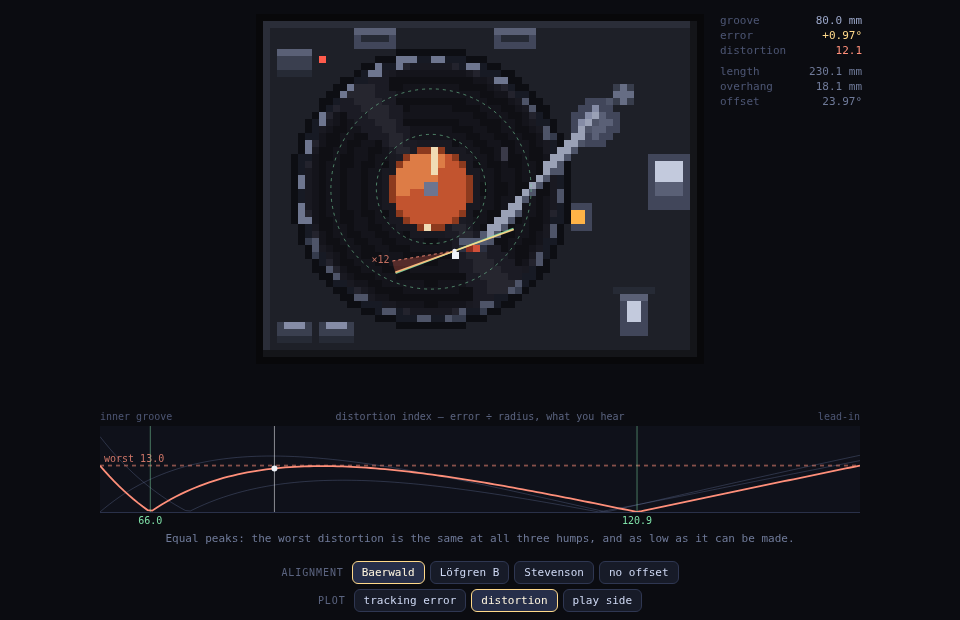
The demo drives the arm from that geometry rather than from canned frames. Drag the stylus across the record and the arm swings to where the real triangle puts it: pivot-to-spindle 212 mm, effective length and offset angle solved from the alignment you picked. Two dotted rings on the record are its null radii, the two circles where the cantilever is genuinely tangent. At the stylus, the green line is where the groove is going and the amber line is where the cartridge is pointing; the gap between them is the tracking error, redrawn once at ×12 because at true scale it is a pixel wide, which is itself the point.
Three published alignments and one control:
- Baerwald (Löfgren A) nulls at 66.0 and 120.9 mm, and the plot shows why it is the default: switch to the distortion trace and its three humps all touch the same line. Equal peaks, as low as the worst case can be made.
- Löfgren B nulls further apart, lower error across most of the side, and a last groove that is meaningfully worse.
- Stevenson nulls at 60.325 — the innermost groove IEC allows — buying zero error exactly where the groove is slowest, and paying for it everywhere else.
- no offset: a straight arm pointed at the spindle. 8° wrong at the inner groove and 20° at the lead-in, which is the error the other three exist to fight.
The second plot is the one that settles arguments. Tracking error alone is misleading: distortion from a crooked stylus scales with error divided by groove velocity, and velocity falls with radius, so the same half degree is about twice as audible at 60 mm as at 120. Dividing by radius is what turns three curves that look similar into three different opinions, and it is why the last track on a side is the one that breaks up.
Reuse
export/deck-sheet.png— 1152×50 strip, eighteen 64×50 frames inFRAME_ORDER:spin-0…7,cue-0…5,stuck-0…3.deck-{spin,cue,stuck}-*.png— the individual frames.deck@6x.png— prescaled 6× hero shot for docs/previews.
Render at integer scales with nearest-neighbor filtering or the edges smear.
spin plays at 8 fps, cue at 4, stuck at 6 (ANIMATIONS carries all three).
The module is worth importing rather than the PNGs if you want the arm to do
anything. paintScene(ctx, spec, opts) takes a frame spec directly — platter
phase, groove radius in millimetres, alignment id, lifted, tick — so the arm
angle is a parameter rather than baked pixels. The geometry is exported on its
own too, and has no drawing in it:
geometryFor(id, D)→{ L, overhang, offset, nulls }for an alignment at a mounting distance, fromL = √(D² + n₁n₂)andsin offset = (n₁ + n₂) / 2L.armPose(geom, mm)→ where the stylus, tube and cantilever are, plus the signed tracking error there.trackingError(geom, mm)anddistortionIndex(geom, mm)— the two plots.
Gotchas
PX_PER_MMis derived, not chosen. It comes out of the distance between the drawnPIVOTand the drawnSPINDLE, which is 212 mm by definition. Move either pixel and every radius on the record rescales with it — which is the behaviour you want, but it means nudging the arm pillar one pixel to the right is a geometry change, not a cosmetic one.validateGrids()checks that each alignment actually nulls where it claims to (within 0.01°) and that it is not zero between its nulls. Both matter: the first catches a sign flip in the offset rotation, which otherwise draws a perfectly plausible arm that is wrong everywhere, and the second catches the degenerate case where the error collapses to a straight line.- The ×12 on the error wedge is display only. The rays themselves are true, and the arm is drawn from the same pose the numbers are read off — there is no second, prettier arm for the picture.
- The strobe dots step by frame rather than beating against a mains flicker, because a sprite has no 50 Hz lamp. Do not read the platter speed off them.
- Dust and scuffs use a deterministic hash rather than
Math.random, so a re-render produces byte-identical PNGs. Swap in real randomness and every run is a diff.
Source
No .aseprite — the canonical source is source/inner-groove.mjs: a
framework-free ES module holding the deck as a character map (one char per
pixel, palette at the top), with everything round or moving painted
procedurally over it. Edit and regenerate everything with:
node source/render.mjs(needs site/node_modules installed — the script resolves Playwright from
there.) That one command rewrites export/, media/ frames, thumb.png,
and the demo’s bundled copy of the module, so nothing drifts. The demo
screenshot in media/ comes from node scripts/screenshot-demo.mjs, which also
fails on any page error — SHOT_W=900 SHOT_H=480 renders it at the site’s embed
size, which is the one that catches a chart colliding with its own controls.